Building Persistence with an Autonomous Self-Improving AI Agent
Static code becomes brittle when business requirements change faster than a sprint cycle. That is why the idea of an autonomous self-improving AI agent is getting real attention: not as another chatbot, but as a system that remembers what worked, refines how it operates, and becomes more useful over time. After testing Hermes Agent from Nous Research, the most interesting part was not just tool use or model flexibility — it was the built-in learning loop that lets the agent persist knowledge, create reusable skills, and improve across sessions instead of resetting every time a conversation ends.
This matters for teams that need more than prompt-response workflows. In production environments, repetitive requests usually hide process knowledge: how reports should be formatted, which steps are mandatory, which tools are preferred, and what “done” actually looks like. Hermes Agent is designed to capture more of that operational memory so the system becomes increasingly aligned with how your team works rather than forcing everyone to start from zero each time.
Running an autonomous self-improving AI agent in production
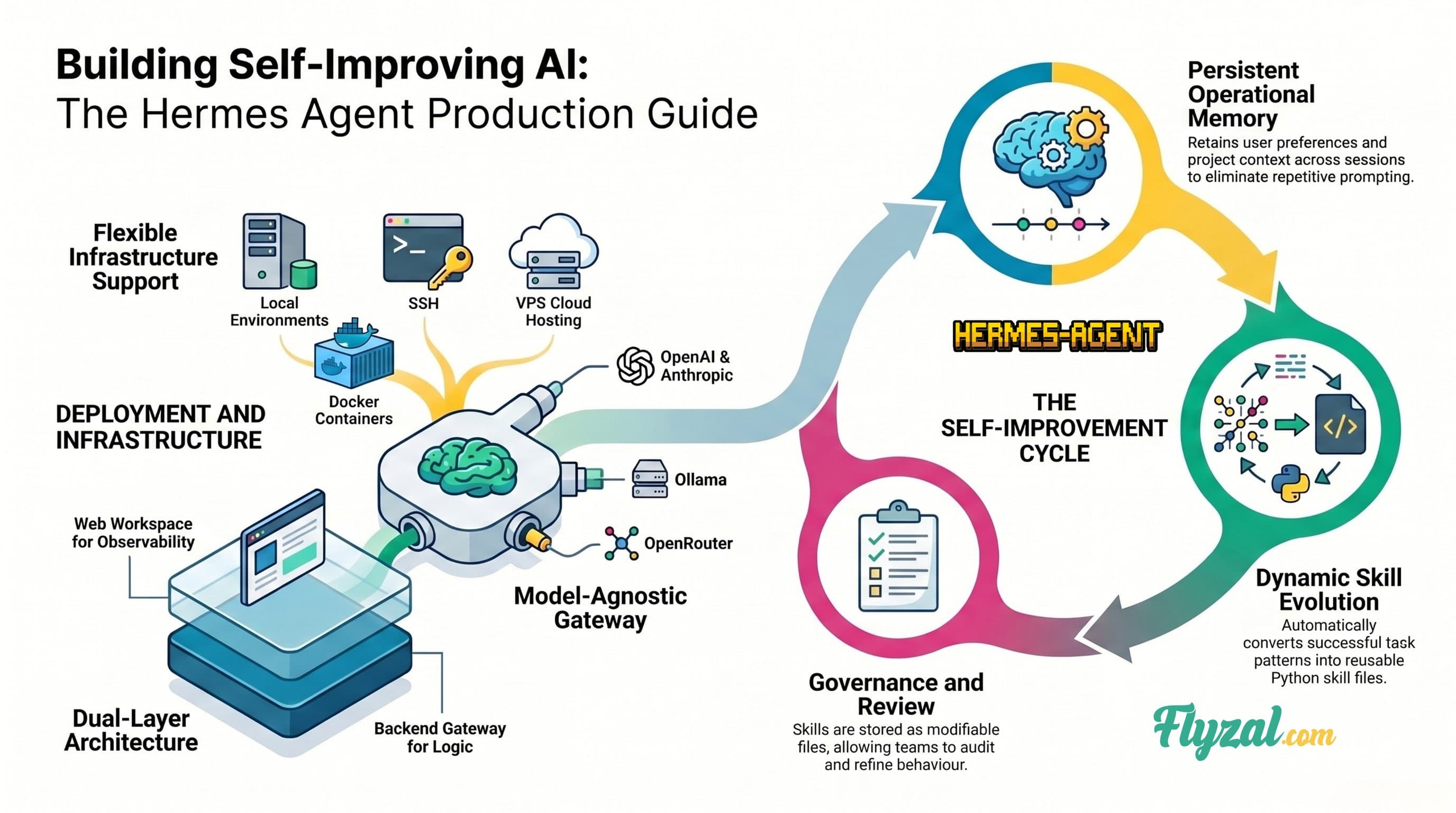
One of Hermes Agent’s practical strengths is that it is not tied to a single laptop session. Nous positions it as an agent that can live on your own infrastructure, with support for multiple execution backends including local environments, Docker, SSH, Singularity, Daytona, and Modal, which makes it more suitable for persistent use than desktop-only agent tools. That architecture gives teams more control over where compute happens and how data is handled, which is useful when you need deployment choices that align with privacy, residency, or enterprise security requirements.
Hermes also supports a multi-platform gateway model, so the same agent can be reached from interfaces like CLI and messaging platforms while continuing to use the same memory and skill system underneath. In practice, that means the agent can learn that a “report” for one stakeholder means a specific Markdown structure, recurring sections, and maybe even particular diagrams or artifacts, then reuse that pattern later instead of making you restate it every time.
Why the workspace layer matters
If Hermes Agent is the brain, Hermes Workspace is the operating console. The workspace project presents itself as a native web workspace for Hermes Agent with chat, terminal, memory, skills, files, and inspection views, making it much easier to operate than relying on CLI alone. It also publishes a simple install/start flow: install, run the Hermes gateway on port 8642, then run the workspace UI on port 3000, with the workspace acting as the front end over the agent backend.
That pairing is what makes Hermes more usable for day-to-day work. Instead of treating the agent as an invisible background process, the workspace gives you visibility into what it knows, what skills it has loaded, and what tools or terminal actions it is taking. For teams experimenting with persistent agents, that observability is important because it reduces the “black box” feeling that often makes agent systems hard to trust.
The reality of implementation
This is still a builder’s stack, not a polished SaaS product. Hermes Agent’s quickstart expects you to be comfortable with shell commands, Python tooling, configuration, and provider setup, and its richer features extend into skills, toolsets, MCP integrations, and optional extras like voice mode. If your team does not have someone who can manage Python environments, containers, and prompt/skill hygiene, the learning loop can become messy instead of helpful.
There is also a governance issue: a self-improving agent can accumulate bad habits if you let it generalize from noisy edge cases. Hermes’s skill system is powerful, but skills live as modifiable files under ~/.hermes/skills/, which means teams need review practices for what gets created, edited, and reused over time. In other words, persistence is valuable only if you also manage it.hermes-agent.nousresearch
Git Repository here: https://github.com/nousresearch/hermes-agent
Combined install and usage guide
Below is a practical guide that combines the official Hermes Agent install, the Hermes Workspace UI, and an optional community skills/autopilot layer that you should validate before relying on it publicly.
1. Install Hermes Agent
On Linux, macOS, WSL2, or Termux, the official quickstart uses the one-line installer below:
bash
curl -fsSL https://raw.githubusercontent.com/NousResearch/hermes-agent/main/scripts/install.sh | bash
source ~/.bashrc
Windows users are directed to use WSL2 first, then run the same install flow inside WSL2.
2. Run initial setup
After installation, configure the agent provider using the built-in setup flow:
bash
hermes setup
Hermes supports multiple providers and OpenAI-compatible endpoints, including Nous Portal, OpenRouter, OpenAI, Anthropic, Ollama, LM Studio, and others depending on your backend choice.
3. Start the Hermes gateway
Run the backend service that handles models, memory, and skills:
bash
hermes gateway run
By default, the gateway is presented as running on port 8642 in the workspace install guide.
4. Install Hermes Workspace
The workspace site provides a one-line installer that installs prerequisites, installs hermes-agent from PyPI if needed, clones the workspace, and wires the environment:
bash
curl -fsSL https://hermes-workspace.com/install.sh | bash
If you prefer cloning manually, use the repo directly:
bash
git clone https://github.com/outsourc-e/hermes-workspace.git
cd hermes-workspace
5. Start the workspace UI
From the workspace directory, start the web UI:
bash
pnpm dev
The workspace documentation presents the UI on port 3000, with an option to launch both the gateway and UI together via pnpm start:all.
6. Verify the basic architecture
Your setup should now look like this, which matches the architecture shown in your diagram: browser → Hermes Workspace UI → Hermes Agent backend → model provider API. The workspace sits on top of the agent and gives you an interface for chat, memory, skills, files, and terminal access.
7. Test a first useful task
Start with a task that benefits from persistence and repeatability, for example:
“Draft a weekly engineering report in my preferred Markdown format.”
“Research three competitors and store a reusable briefing template.”
“Create a skill for generating release notes from Git commits.”
This is where Hermes’s learning loop becomes useful, because repeated successful patterns can be turned into reusable skills rather than remaining one-off prompts.
8. Add or manage skills
Hermes ships with a built-in skill library and stores skills under ~/.hermes/skills/. You can inspect what exists and manage skill behavior from there.
Example:
bash
ls ~/.hermes/skills
hermes chat --toolsets skills -q "What skills do you have?"
Create a custom skill:
Skills are Python files that define reusable functions. You can create them manually or ask Hermes to generate them based on successful task patterns.
9. Advanced: Memory and Context Management
Hermes uses a persistent memory system to remember:
User preferences
Successful task patterns
Project context
Tool usage history
View memory:
Use the Memory tab in Hermes Workspace to inspect what the agent has learned.
Clear or edit memory:
Memory files are stored in ~/.hermes/memory/. You can manually edit or clear them if the agent develops incorrect assumptions.
10. Production Deployment Considerations
Self-hosting options:
Run on a VPS ($5/month DigitalOcean/Linode)
Deploy to AWS Lambda or Google Cloud Functions
Use Docker containers for isolation
SSH into remote environments
Data residency:
Because you control where Hermes runs, you can ensure data stays within specific geographic regions (EU, GCC, ASEAN) for GDPR or local compliance requirements.
Model cost management:
Use local models (Ollama) for development
Use Nous Portal or OpenRouter for production (cost-effective)
Reserve GPT-4/Claude 3.5 for complex tasks only
Monitor token usage via gateway logs
Optional: Community Extensions
You can extend Hermes with community skill packs, but verify compatibility with your installed Hermes version before deploying to production. The skills ecosystem is still evolving, so test thoroughly in a sandbox environment first.
Frequently Asked Questions
Does Hermes require specific LLM providers?
No. It's designed to be model-agnostic. You can run it with OpenAI, Anthropic, local models via Ollama, or any OpenAI-compatible endpoint. This is vital for organizations maintaining strict security standards or operating in regions with data residency requirements.
Can it be integrated into existing CI/CD pipelines?
Yes. Because it can run in a cloud VM and provides an API-first approach, it fits into standard DevOps workflows much better than desktop-bound AI tools. You can trigger Hermes tasks from GitHub Actions, GitLab CI, or Jenkins.
How do I prevent the agent from learning bad habits?
Implement skill review processes. Hermes stores skills as editable files in ~/.hermes/skills/, so you can audit, edit, or remove skills that don't match your standards. Treat it like code review for agent behavior.
What's the difference between Hermes Agent and ChatGPT?
ChatGPT is stateless—each conversation starts fresh. Hermes Agent persists memory, learns from successful outcomes, and builds reusable skills over time. It's designed for ongoing work, not one-off questions.
Want To Hire Me?
I build free and paid tools at flyzal.com that put these ideas into practice. Access requires an account, with fast sign-in via Google or GitHub. I also work with companies that want these concepts turned into production-ready software for their teams.